Before the Browser Bookmark: How People Kept Web Addresses
Before browser bookmarks, keeping web addresses meant recording them elsewhere. See how bookmarks changed the route back to a page without preserving its contents.
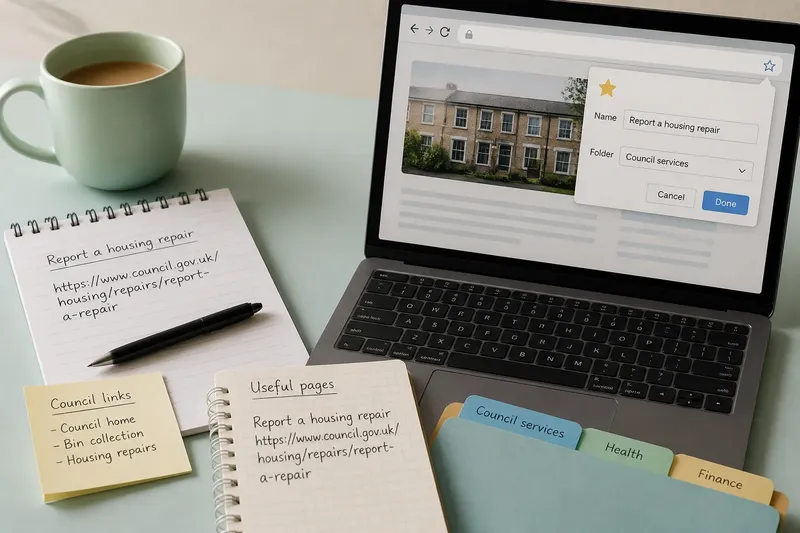
Imagine finding a useful page on a shared computer, then reaching for a notebook to copy its address before you leave. Before browser bookmarks, keeping web addresses meant recording them elsewhere; browser bookmarks later brought that saved route into the tool used to open it.
Addresses outside browsers
There was no single method everyone used. A reader could write an address on paper, paste it into an email, or keep it in a text file. These are practical ways to describe saving a URL, not a claim that one method came first or was universal.
The address was only one part of the record. A reader also had to remember where the note lived and how to get it back into a browser. A text file could be searched, but it still had to be opened separately; paper could be handy at a desk, but not necessarily at another computer.
Long addresses made copying by hand particularly awkward. Even when an address was copied and pasted, the saved record might not include the page title or the reason it mattered. The method preserved a route, not the circumstances of finding it.
The browser takes a role
A browser bookmark stored a page’s address in the same application used to visit it. Instead of locating a separate note and transferring its contents, a reader could open a saved entry from the browser. The practical change was fewer hand-offs between tools.
Bookmarks could also be given titles and arranged in folders. These features helped a reader distinguish one saved destination from another, but they did not make every collection easy to retrieve from. A folder full of vague labels could still leave someone guessing.
This account describes the functional shift rather than a precise timeline: the supplied material does not establish when browser bookmarks first appeared or when they became familiar to particular groups of users. The useful distinction is what the browser-based method did, not an unsupported claim about exactly when people adopted it.
Routes and page contents
A saved URL is a route to a page, not a copy of that page. The site might change its layout, move the material or make it unavailable. A bookmark can remove the need to retype an address, but it cannot control what happens at the destination.
That distinction matters when a page is saved for an exact detail. If the information needs to remain available, check whether the site offers an official document or another permitted way to retain it. For legal, financial or safety matters, ask the responsible organisation or a qualified professional rather than relying on a bookmark as the sole record.
What changed in practice?
Say a reader has opened a council page about reporting a housing repair. In this invented example, the starting point is a page open in a browser and no saved copy of its address. The reader selects the browser’s bookmark control, keeps the page’s recognisable title, and saves it in a folder used for council services.
The resulting decision is straightforward: the reader can return through the browser’s bookmark list without opening a separate note or retyping the URL. If the page later moves or disappears, the bookmark will not preserve its instructions; the reader will need to look for the current council page or contact the council. The expected observable result is a shorter route back while the destination remains available, not a lasting copy of its contents.
What can a bookmark do?
Does a bookmark save the page itself?
No. It saves a route to the page, not a complete copy of its text or images. If the site changes or removes the page, the bookmark may no longer lead to the material the reader wanted.
Can bookmarks move between computers?
Some browser accounts can synchronise bookmarks across devices, while a local bookmark may remain only in that browser profile. Check the browser’s account and sync settings; if the saved list is not available on the other device, use the original profile or the browser’s supported export option.
Why might a saved page be hard to find?
A large collection, broad folder names or shortened page titles can make the right entry difficult to recognise. Search the browser’s bookmark list or open the relevant folder; if the label remains ambiguous, rename the entry to identify the destination rather than trying to remember the original address.
When is a bookmark not enough?
It is not enough when the goal is to preserve a page’s contents or maintain an authoritative record. Check for an official document or contact the organisation responsible for the information; for consequential legal, financial or safety questions, seek qualified advice.
Keeping the distinction clear
Browser bookmarks changed the mechanics of returning to a page: the browser could hold its address and open it directly. They did not remove the need to decide what a saved entry was for, nor did they preserve the page itself.
That is the useful history of saved pages in miniature: a route once recorded outside the browser could be kept inside it, making retrieval more direct. When you save a browser bookmark, ask whether you need a quick route, the page’s contents, or an authoritative record; that answer tells you whether a bookmark is enough.